Mechanics Guide
How to Reload in WARDOGS: Magazines, Loose Ammo & Refilling Mags Explained
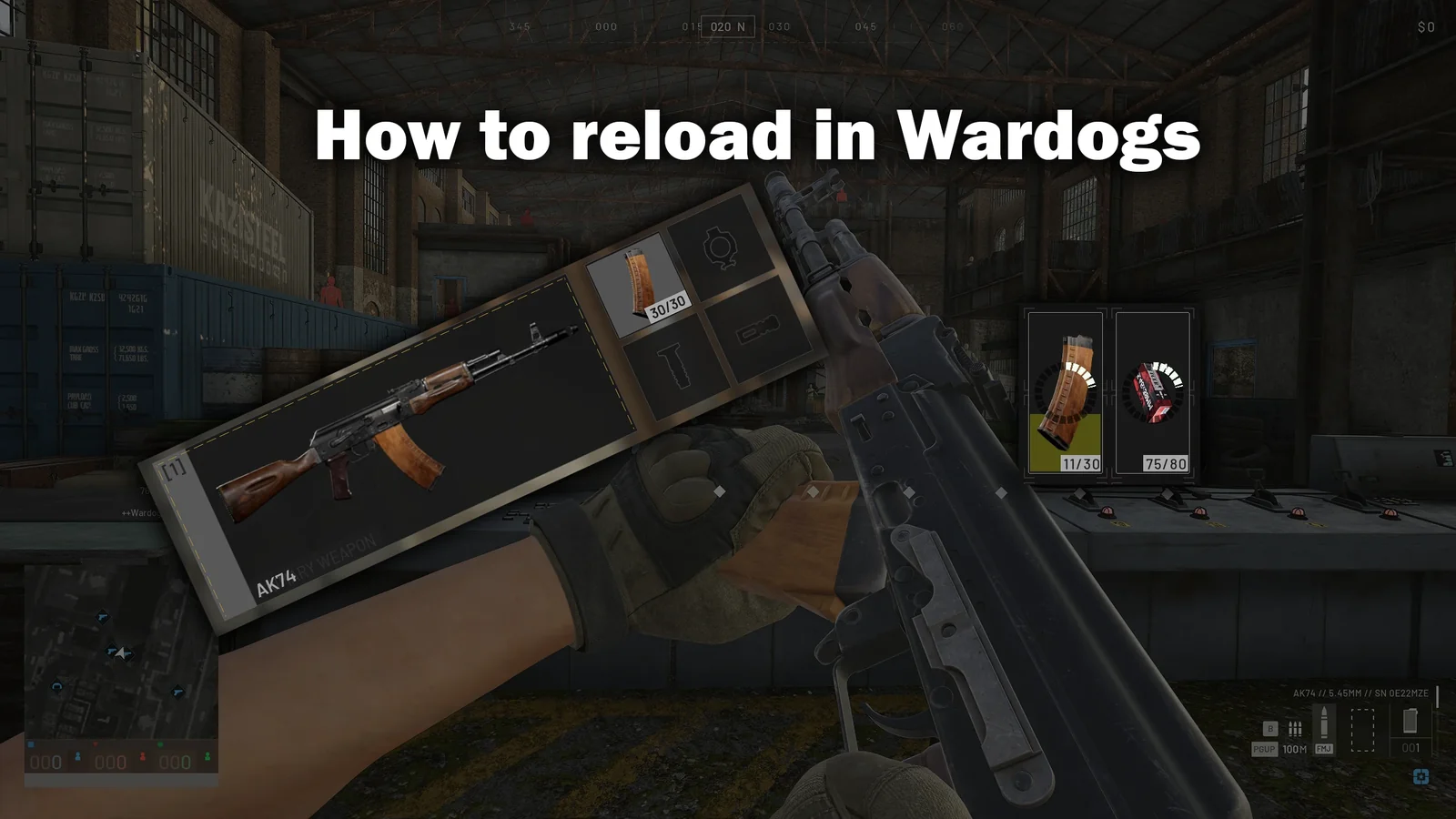
Reloading in WARDOGS catches everyone out at least once: the R key swaps magazines, but it never refills them. Here's the complete ammo loop - buying mags and loose ammo at the vendor, reloading in battle, and topping your magazines back up mid-match - with screenshots of every step.
Quick Answer: How Reloading Works in WARDOGS
Press R to swap your current magazine for the next one in your backpack - in whatever state that mag is in. A half-filled mag goes in half-filled; an empty one goes in empty. To actually refill magazines, press Tab to open your inventory and drag loose ammo onto the magazine. It refills one round at a time, so do it behind cover.
WARDOGS handles ammunition more like Escape from Tarkov than Battlefield: every magazine is a real, individual item with its own round count and ammo type. That means ammo management starts at the vendor before you ever fire a shot - and if you skip the loose ammo step there, you'll be down to your last rounds five minutes into your first fight. Let's walk the full loop.
Step 1: Buying Magazines at the Vendor
After you pick a weapon at the equipment vendor, open its Ammo tab. The magazine builder walks you through three steps, left to right:
- Select your magazine - you'll only have the default unlocked at first (for the AK74, that's a 30-round mag chambered in 5.45×39mm).
- Select the ammo type to fill it with - Standard (FMJ), Flesh Damage (HP), or Armor Piercing (AP).
- Click the ready magazine on the right (highlighted green) to add the filled mag to your loadout.
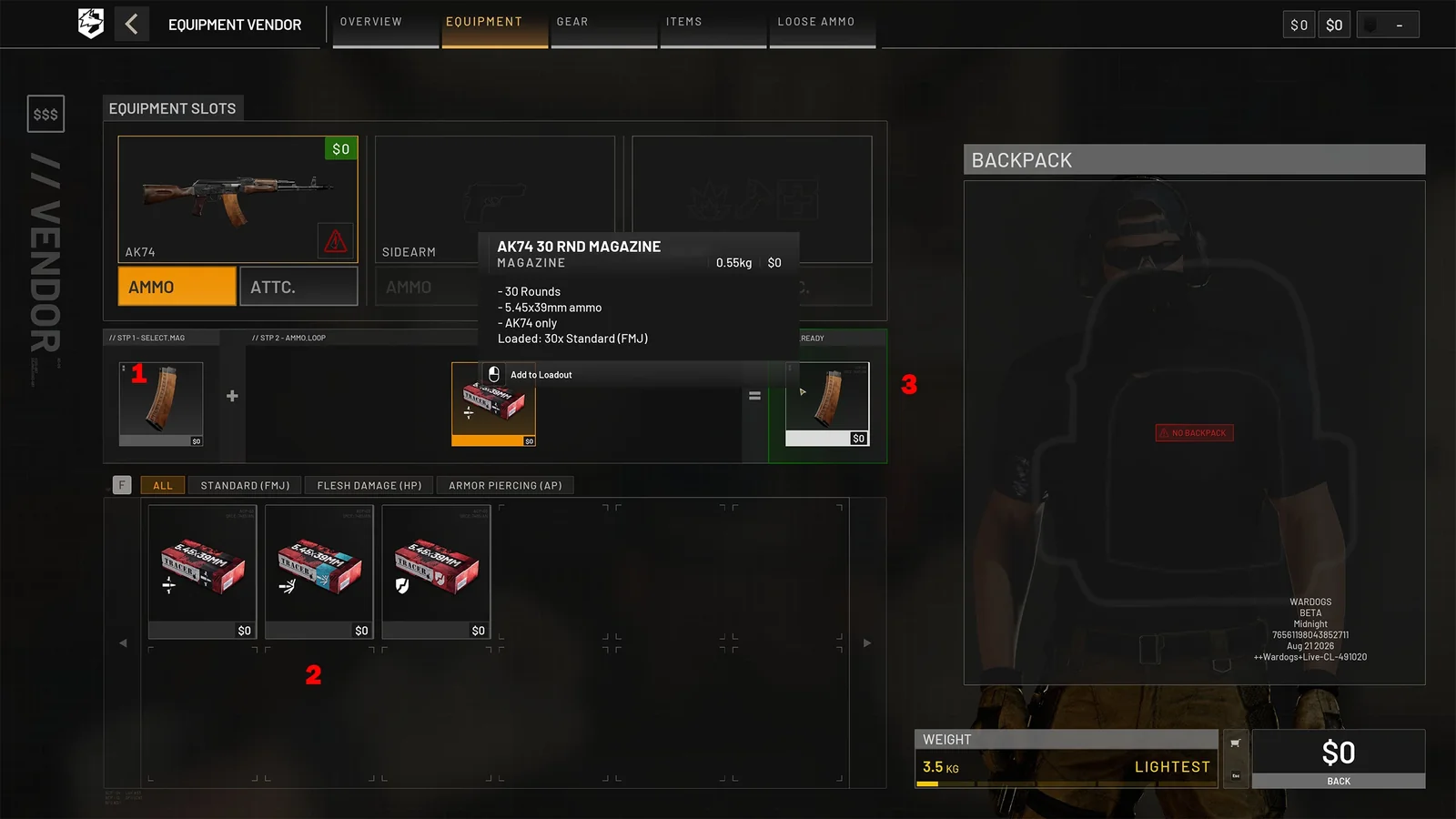
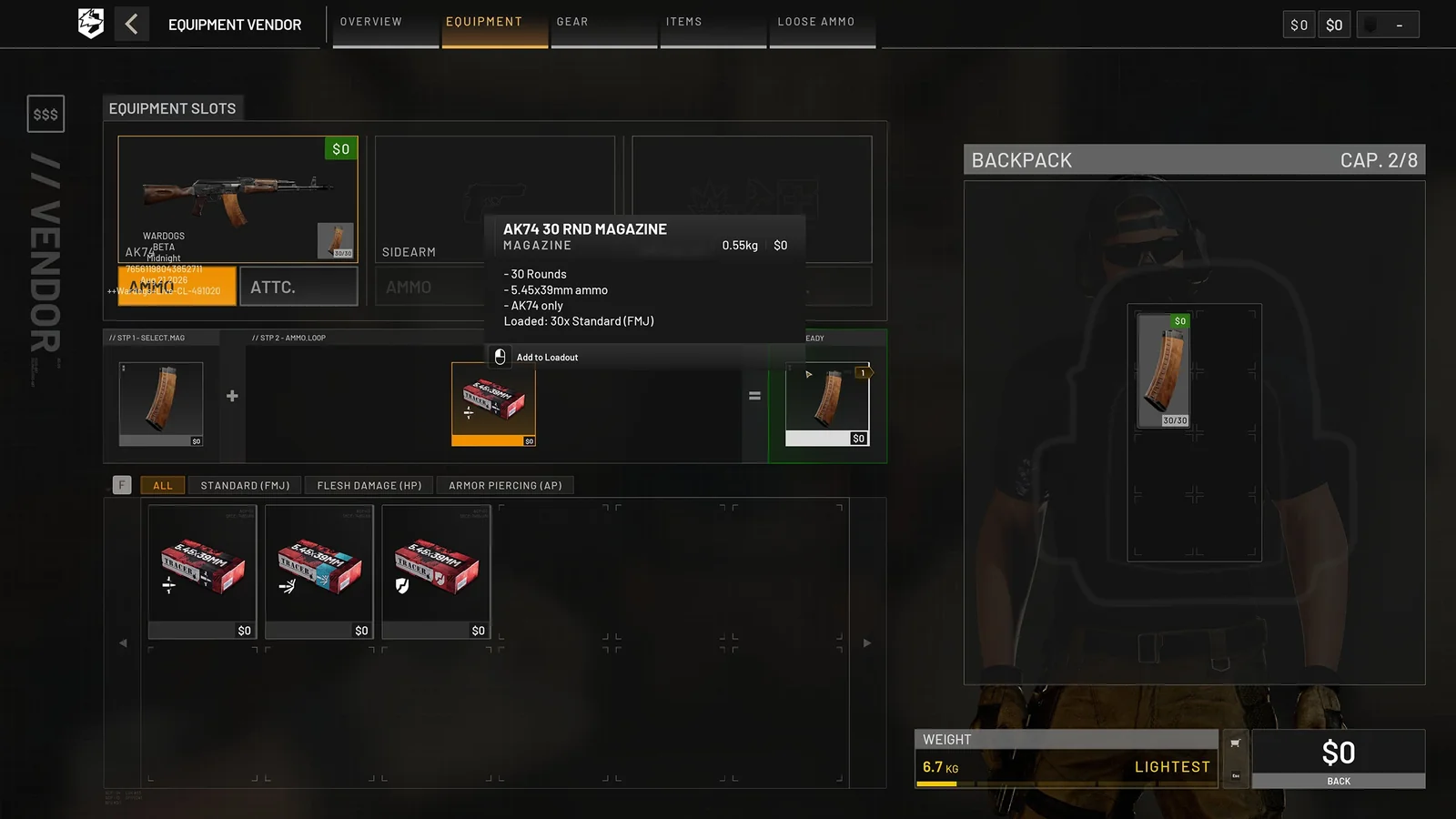
Your first click puts the magazine into the weapon itself. Click it again and the game will stop you if you don't own a backpack yet - spare magazines have to live somewhere.
Step 2: You Need a Backpack for Spare Mags
Buy a backpack from the Gear tab first (the free Pouch works for game one), then come back and click the ready magazine again. Each additional click now adds another filled mag into your backpack, taking up grid space.
Step 3: Buy Loose Ammo (Don't Skip This)
This is the step that separates players who stay in the fight from players who run dry. Head to the Loose Ammo tab along the top of the vendor menu and find the caliber that matches your magazines - for the AK74, that's the red 5.45×39mm boxes.
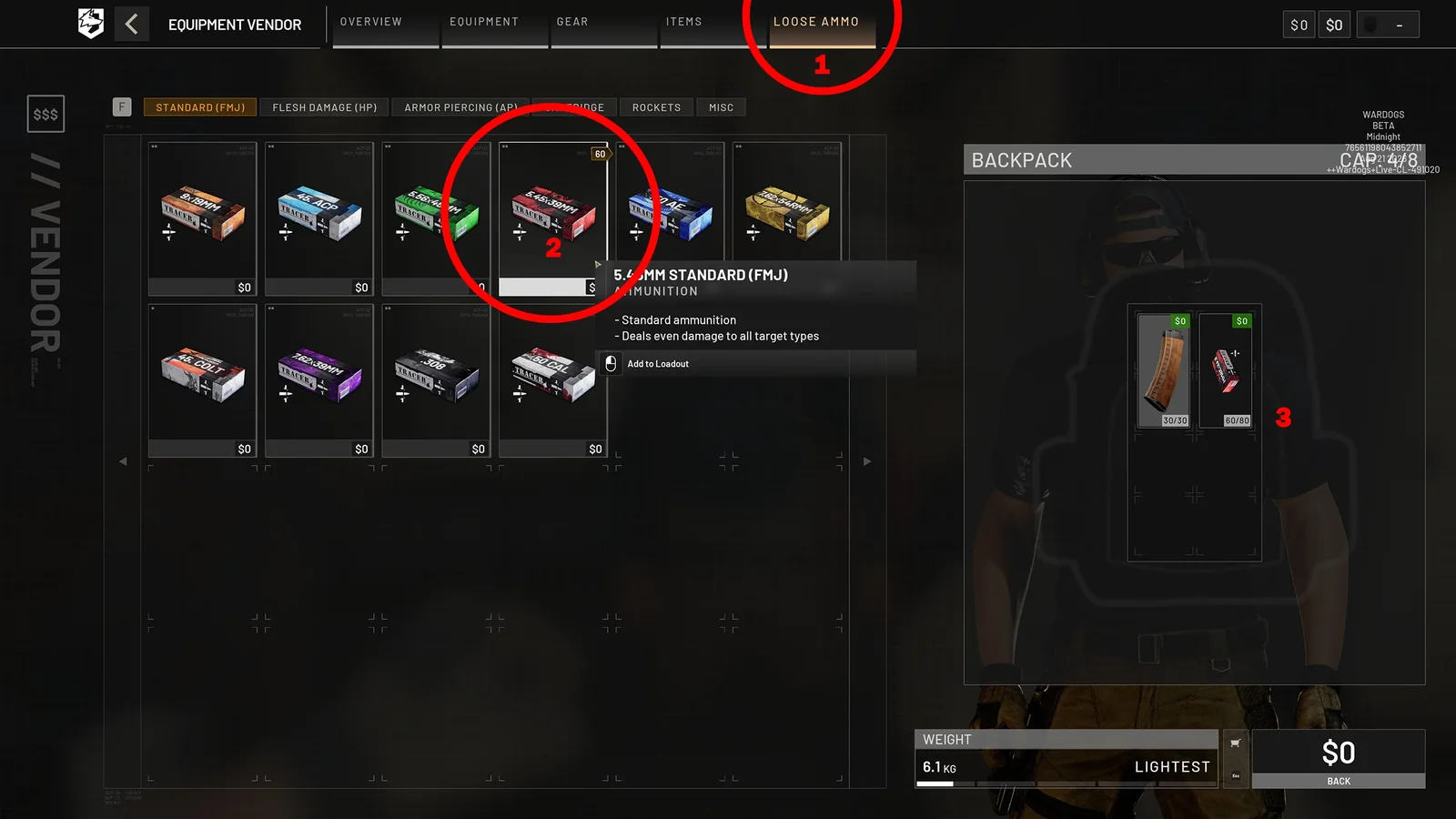
- Every click adds 10 rounds, each charged separately.
- Rounds stack in one backpack slot - up to 80 for 5.45×39mm (stack sizes vary by caliber).
- Buy the caliber your magazines actually use. The tab lists every caliber in the game, and nothing stops you from buying the wrong one.
Why loose ammo instead of more filled mags? Space. One stack of 80 loose rounds takes a single slot and refills nearly three AK74 mags - the same slots' worth of filled magazines would hold far less total ammo. Loose ammo is the compact fuel; magazines are just the containers.
Reloading in Battle: What R Actually Does
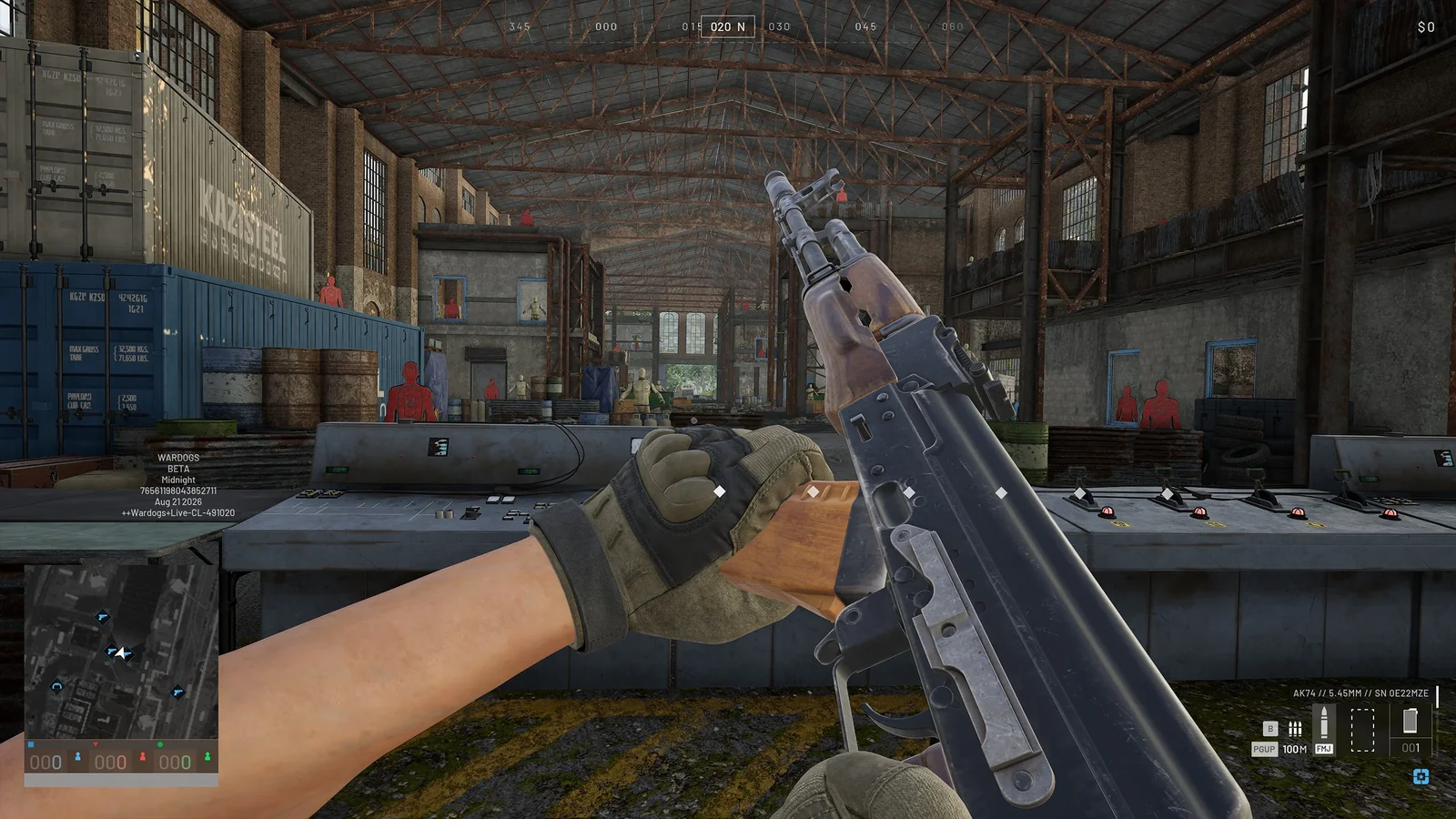
In battle, R works like you'd expect - right up until it doesn't. Here's the crucial mechanic:
⚠️ The mechanic that catches everyone
Reloading swaps magazines, it doesn't refill them. Your current mag goes into the backpack in its current state, and the next mag comes out in its current state. If your spare was sitting at 11/30, you'll reload into an 11-round mag - and the game will happily let you reload an empty one.
WARDOGS tracks every magazine individually. Rounds never magically redistribute between mags, which means after a couple of firefights your backpack is a collection of partially-empty magazines - and it's your job to consolidate them.
Refilling Magazines Mid-Match
To top your mags back up during a match:
- Press Tab to open your inventory.
- Find your loose ammo stack in the backpack (right side of the screen).
- Drag the loose ammo onto an empty or partially filled compatible magazine.
- The refill animation loads the mag one round at a time - you can stop at any moment by closing the inventory.
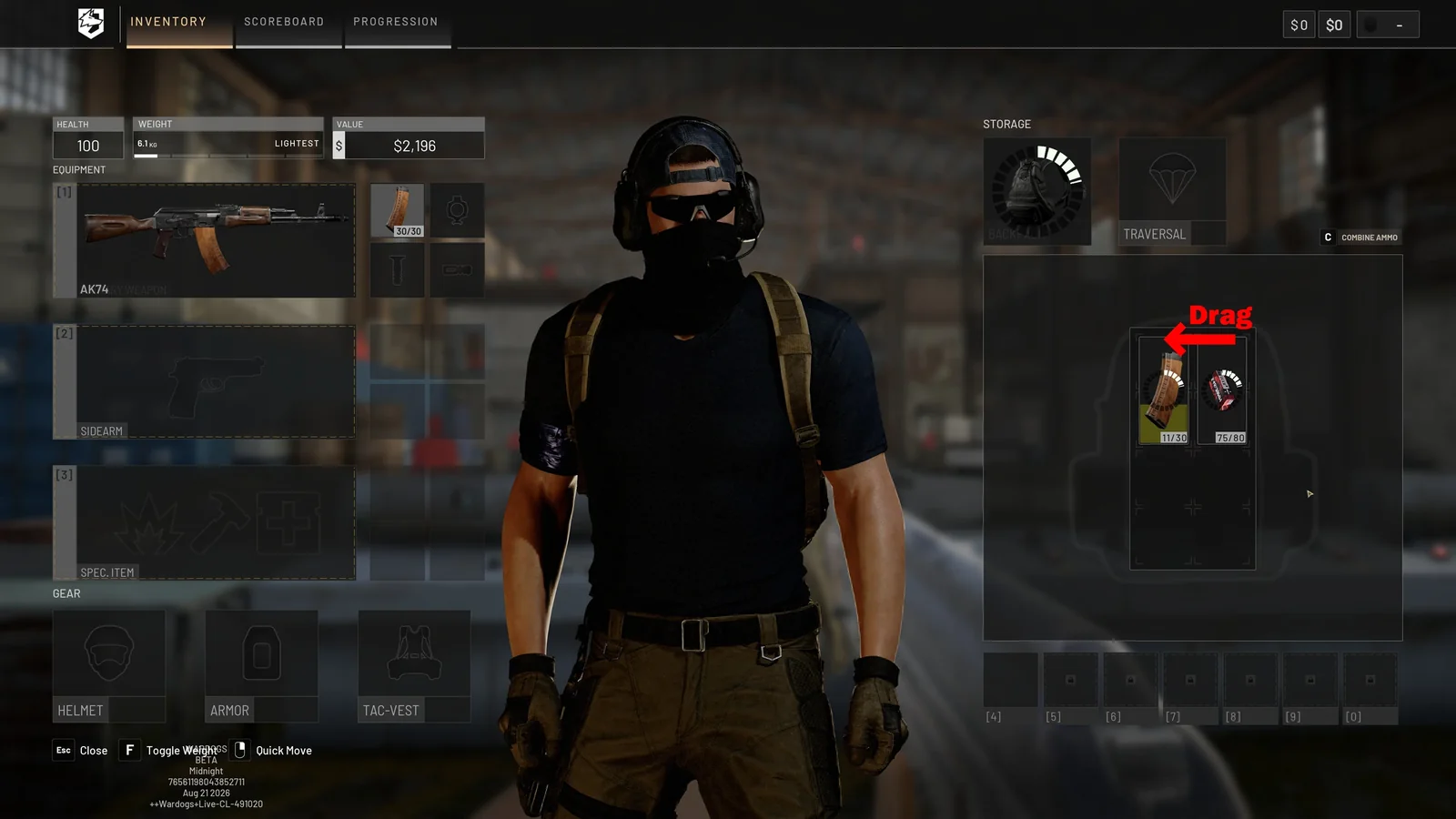
💡 Pro Tip
The inventory screen also lists a Combine Ammo shortcut - C by default - which speeds up topping off your mags and tidying your stacks. Make refilling a habit after every fight, not during one.
⚠️ Find cover first
Refilling takes real time, and while your inventory is open you can't see the battlefield at all. Never open it in the open. Get behind hard cover - or better, a wall inside a building - before you start dragging rounds.
The Space Trade-Off: Mags vs Meds
Early on, this whole system is a space-management puzzle. The backpacks you can afford in your first matches are small, and healing items compete for the same slots as your ammo. A realistic early loadout looks like this:
- 1 magazine in the weapon (30 rounds)
- 1 spare magazine in the backpack (30 rounds)
- 1 stack of 80 loose rounds (roughly 3 more mags' worth)
- The rest of the space for bandages and meds
That's about five magazines' worth of ammo in total - plenty for a life, as long as you keep consolidating. Resist the urge to fill every slot with ammo: running out of bandages kills you faster than running out of bullets, and the weight system punishes over-stuffed backpacks with slower movement and worse handling anyway.
Ammo Types: FMJ, HP, and AP
One more wrinkle: magazines don't care which compatible ammo type you feed them. An empty mag that held Standard (FMJ) can be refilled with Armor Piercing rounds from a fresh loose stack - useful when the lobby starts showing up in Level 3 vests. The three types:
- Standard (FMJ) - even damage against all target types. The default, and fine for everything.
- Flesh Damage (HP) - better against unarmored targets, worse against armor.
- Armor Piercing (AP) - better against armored targets.
Just remember what you loaded where. The mag tooltip shows its contents (e.g. "Loaded: 30x Standard (FMJ)"), but mid-fight you won't be reading tooltips - so keep it simple and run one ammo type per weapon until you're comfortable.
Frequently Asked Questions
How do you reload in WARDOGS?
Press R. It swaps your current magazine for the next one in your backpack - in whatever state that mag is in. Refilling magazines is a separate, manual step done from your inventory (Tab) by dragging loose ammo onto the mag.
Why is my magazine not full after reloading?
Because WARDOGS tracks every magazine individually. If the next mag in your backpack was half-filled, it goes into your weapon half-filled. Rounds never redistribute between magazines automatically.
How do I refill my magazines?
Open your inventory with Tab, then drag your loose ammo stack onto an empty or partial magazine of a compatible caliber. It refills one round at a time and you can stop by closing the inventory. The Combine Ammo keybind (C by default) speeds this up.
How much ammo should I bring?
A good early baseline: one mag in the gun, one spare mag, and one full stack of loose ammo (80 rounds for the AK74's 5.45×39mm) - about five magazines' worth in total, while leaving room for bandages.
Can I put a different ammo type in my magazine?
Yes. Any compatible ammo type can go into the magazine - refilling an empty FMJ mag with armor-piercing rounds is a common mid-match adjustment. Just track what you loaded, since the damage profile changes.
Stay Loaded
The reload loop in one sentence: buy mags and loose ammo at the vendor, press R to swap mags in a fight, and drag loose ammo onto your magazines from the inventory whenever you're safe behind cover. Master that rhythm and you'll never be the player frantically reloading an empty mag mid-push.
New to the game? The full WARDOGS Beginner's Guide covers loadouts, the Control Zone, classes, and the money game.